ActionRing N3 V3 Macro Keyboard Review: Streamline Your Workflow Effortlessly
“This link will take you to Amazon.”
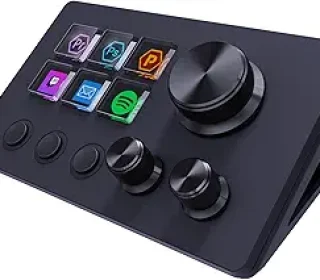
Tired of juggling hotkeys, mouse clicks, and keyboard shortcuts across multiple apps? The ActionRing N3 V3 macro keyboard puts custom control at your fingertips with six programmable LCD keys, three dials, push-button inputs, and USB connectivity for PC. This versatile device turns complex actions into single presses, boosting efficiency for gamers, streamers, and creators alike.
Introduction
In a world of multitasking—editing videos, streaming on OBS, or managing spreadsheets—the ActionRing N3 V3 shines as a compact productivity hub. Compatible with Windows and macOS, it integrates seamlessly via USB, letting you drag-and-drop macros, launch apps, or control media. With customizable icons, animations, and “Action Flow” sequencing, it’s more than a keypad—it’s a personalized command center.
Designed for software like Photoshop, Excel, Discord, and Premiere Pro, this model offers endless customization through its app. Backed by 24-month warranty and tutorial support, it’s ideal for pros streamlining repetitive tasks without bulky setups.
Key Features
ActionRing packs powerful customization into a sleek, desk-friendly form.
Six Customizable LCD Keys: Assign macros, app launches, text entry, or media controls; add JPG/PNG/GIF images for visual cues.
Three Multifunctional Dials: Adjust volume, scrub timelines, zoom, or scroll—endless bindings via software.
Action Flow Sequences: Chain multiple actions in order for complex workflows like OBS scene switches.
Broad Software Compatibility: Works with OBS, PowerPoint, Photoshop, Excel, Discord, YouTube, Twitter, Premiere Pro.
Plugin Ecosystem: 60+ icon packs, plus clocks, weather, calendars, timers—turns it into a smart desktop gadget.
USB Plug-and-Play: Simple connectivity; intuitive app for Windows/macOS setup.
These features make it adaptable for gaming combos, content creation, or office productivity.
The LCD keys glow with custom icons, making shortcuts glance-identifiable.
Pros and Cons
This macro pad excels in flexibility but suits specific power users.
Pros:
Infinite customization via drag-and-drop macros and visuals.
Dials add precise analog control missing in button-only pads.
Compact USB design fits any desk without cables cluttering.
Plugin variety extends use beyond macros to daily utilities.
Cross-platform support broadens appeal.
Solid 24-month warranty and video tutorials ease onboarding.
Cons:
Learning curve for advanced “Action Flow” sequencing.
PC-focused; limited mobile/iPad compatibility.
LCD keys drain battery if wireless mode active (USB primary).
App-dependent—software updates critical for new features.
No haptic feedback on dials for tactile precision.
Niche for non-tech users; overkill for basic needs.
Pros dominate for workflow warriors.
Detailed Review
Setup is breeze: Plug in via USB, download the ActionRing app, and start mapping. Drag macros to keys—like “Ctrl+C/V” for copy-paste or OBS scene swaps. Add GIFs for flair; dials handle volume or Premiere timelines intuitively. The six keys cover core actions, while sequences execute multi-step processes, like “New Layer + Duplicate” in Photoshop.
For streamers, bind OBS transitions; gamers trigger combos; editors scrub footage. Plugins add whimsy—weather glances or timers without alt-tabbing. At desk size, it nests beside monitors, push buttons responding crisply. Software shines with preset templates for Excel sorts or Discord commands.
Runtime? USB powered, so always ready. Cross-macOS/Windows ensures team consistency. Support via videos or chat resolves glitches fast. Minor note: Optimize key images for small screens to avoid pixelation. Overall, it slashes task time dramatically—productivity feels supercharged.
Who Should Buy This Product
Tailored for efficiency seekers customizing their digital life.
Streamers managing OBS scenes/macros.
Video editors scrubbing timelines in Premiere/Photoshop.
Gamers binding complex combos.
Office pros automating Excel/PowerPoint.
Content creators juggling Discord/Twitter.
Multitaskers loving desk widgets.
Casual users or laptop-only setups may skip.
Comparison with Similar Products
| Feature/Product | ActionRing N3 V3 | Elgato Stream Deck Mini | Razer Stream Controller |
|---|---|---|---|
| Keys/Dials | 6 LCD + 3 Dials | 6 LCD Keys | 12 LCD + 2 Dials |
| Customization | Drag-Drop + GIFs | App Presets | Synapse Software |
| Plugins | 60+ Icons/Apps | Limited | Gaming Focus |
| Connectivity | USB | USB | USB/Wireless |
| Price Range | $50–$80 | $60–$90 | $200+ |
| Best For | Versatile Macros | Streaming | Gaming/Pros |
ActionRing wins dials/plugins value; Stream Deck streaming pure; Razer premium gaming.
Frequently Asked Questions
Windows and Mac both?
Yes—seamless app support.
Macro complexity limit?
Unlimited via sequences; chain freely.
Power source?
USB; no battery needed.
OBS integration?
Perfect—scene switches one-tap.
Icon uploads?
JPG/PNG/GIF up to 60 packs.
Warranty claims?
24 months; contact support easily.
Final Verdict
The ActionRing N3 V3 macro keyboard unlocks workflow magic with smart keys, dials, and endless tweaks. It supercharges creativity and speed for under $100—essential for streamers, editors, or power users. Customize your edge; this pad delivers.
Disclosure: This article contains affiliate links. If you purchase through them, I may earn a small commission at no extra cost to you. All opinions are my own based on product details and typical user experiences.