LIMU AI Voice Recorder Review – Smart GPT‑5‑Powered Note‑Taking for Meetings, Calls & Lectures
“This link will take you to Amazon.”
Introduction
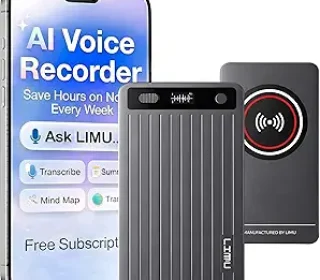
If you’re someone who sits through long meetings, lectures, or client calls, you’ve probably wished for a way to capture everything and then turn it into organized notes without typing a single word. The LIMU AI Voice Recorder (often called the LIMU AI Note‑Taking Device) is a compact, German‑designed audio recorder that uses GPT‑5.5‑level AI to transcribe speech, summarize content, and even generate mind maps—all on a 64 GB, wireless‑charging device that fits in your hand.
Priced around $79–$125 (with coupon discounts available), this isn’t just a basic voice recorder; it’s marketed as an AI‑powered meeting assistant that works across phones, tablets, and desktops. In this review, I’ll break down how it works, who it’s best for, and whether it’s worth the investment for busy students, professionals, and creators.
Key Features
The LIMU AI Voice Recorder packs several advanced features into a slim, portable body.
AI‑Powered Smart Voice Notes
The device records your voice or conversations, then uses built‑in or cloud‑based GPT‑5.5‑level AI to turn spoken words into organized, searchable notes far beyond what a regular digital recorder can do.Transcribe, Summarize & MindMap
After recording, you can get:Full transcripts of meetings, interviews, or lectures.
Summaries that highlight key points, decisions, and action items.
Mind maps that visually link ideas, making it easier to review and study.
125‑Language Support
The AI tools support up to 125 languages, making this useful for multilingual users, global students, or professionals who work with international teams.64 GB Storage & 60‑Hour Battery
With 64 GB built‑in storage, you can store hundreds of hours of audio, and the 60‑hour battery lets you record long meetings, conference days, or multi‑day training sessions without constantly recharging.Wireless Charging & USB‑C
The recorder supports Qi wireless charging (pad not included) and comes with a USB‑C cable, so you can charge it on a wireless pad or plug it into a computer or power bank.Bluetooth & App Integration
It connects via Bluetooth to smartphones and tablets, and uses a companion app to sync, edit, and export your recordings, notes, and mind maps across devices.On‑Device Encryption & Privacy
Recordings and AI processing are said to use on‑device encryption, so you keep control over what gets shared and when, which matters for confidential meetings or sensitive content.No Headphone Jack
The device itself doesn’t have a headphone jack, but you can listen through your phone, tablet, or computer after syncing.
For someone who wants to replace manual note‑taking with an AI‑assisted workflow, these features make the LIMU feel like a true “meeting‑brain” in your pocket.
Pros and Cons
Pros
Hands‑free note‑taking
You can focus on the meeting, class, or conversation while the LIMU quietly records and later turns speech into structured notes.GPT‑5.5‑level AI for summaries and mind maps
The AI doesn’t just transcribe; it extracts themes, connects ideas, and generates visual mind maps, which speeds up review and retention.Excellent battery life
Up to 60 hours of recording on a single charge means you can use it for full‑day events or long travel days without worrying about power.Large 64 GB storage
Enough space for many hours of lectures, interviews, or calls, so you don’t need to constantly delete old recordings.Multi‑device workflows
Record on the device, then sync to your phone, tablet, or desktop app, so you can trim, edit, and export notes across platforms.Focus on privacy
With on‑device encryption and user control over sharing, it’s a safer option for confidential or work‑related content than some cloud‑only apps.
Cons
AI features may have a usage limit
Some LIMU‑style AI recorders offer X minutes of AI analysis per month (for example, 400 AI minutes forever), after which you can still use it as a standard recorder but not for AI features.Price point is higher than basic recorders
At around $75–$125, it’s significantly more expensive than a simple MP3 recorder, which may not suit casual users.Setup and app use required for full power
To get the most out of transcription, summaries, and mind maps, you need to install and use the app and understand the workflow, which can be a small learning curve.No built‑in headphones jack
If you want to listen back in real time, you’ll need to connect to your phone or computer rather than using traditional headphones directly on the device.
Overall, the pros make this a strong fit for power users, students, and professionals who rely on productive note‑taking.
Detailed Review
How It Works in Practice
The LIMU AI Voice Recorder operates in a few simple modes:
Record
Press the button, and the device starts recording clear audio for meetings, calls, lectures, or brainstorming sessions. It stores the audio on the 64 GB internal memory.Transcribe
After the session, you can either let the device begin processing the file (if using on‑device AI) or upload/sync it to the app, where GPT‑5.5‑level transcription turns speech into text. Users report that the transcription is noticeably more accurate than basic phone‑based transcribers, especially for fast‑moving conversations.Summarize & MindMap
The AI then generates a summary that pulls out key points, decisions, and action items, plus a mind map that graphs relationships between ideas, which is very helpful for studying, reporting, or planning.Sync Across Devices
Via Bluetooth and the companion app, you can move recordings, edit, trim, and export notes to your phone, tablet, or desktop, so your workflow stays smooth from lecture to office to home.
Battery Life and Usability
The 60‑hour battery life is one of the standout specs. In real‑world use, that means:
A full day‑long conference or training session without a recharge.
A long business trip where you record multiple meetings back‑to‑back.
Months of less‑frequent use before you need to plug it in.
The wireless charging adds convenience; you can drop it on a charging pad at your desk or bedside. Combined with the USB‑C cable, you’re covered whether you prefer wireless or wired charging.
Privacy and Security
The product emphasizes on‑device encryption and user control:
You choose when and what to send to the app or cloud.
Sensitive recordings stay on the device unless you export them.
Ideal for confidential meetings, legal discussions, or personal journaling where privacy is a priority.
Who It’s Best For
The LIMU AI Voice Recorder shines for:
Students who attend long lectures or webinars and want automatic summaries and mind maps for studying.
Professionals (managers, consultants, lawyers, freelancers) who sit in multiple meetings and need clear, searchable records.
Creators and content‑makers who brainstorm ideas, interview guests, or record voice notes, then turn them into structured notes or scripts.
Multilingual users who need transcription and summaries in 125 languages.
It’s less ideal if:
You only need basic voice recording without AI features.
You’re on a tight budget and don’t plan to use the AI note‑taking often.
Comparison with Similar AI Recorders
Here’s how the LIMU AI Voice Recorder compares with a few similar devices:
| Feature | LIMU AI Voice Recorder (GPT‑5.5) | Umevo Note AI Voice Recorder | Other AI Recorders (e.g., soundcore Work) |
|---|---|---|---|
| AI engine | GPT‑5.5‑level AI | ChatGPT‑based | Proprietary AI |
| Storage | 64 GB | Variable (often 8–16 GB) | Lower storage models |
| Battery life | Up to 60 hours | Usually 10–20 hours | Often 10–15 hours |
| Wireless charging | Yes | No | No or limited models |
| Languages | 125 languages | Fewer (often 30–60) | Varies |
| Mind map & summaries | Yes | Yes | Sometimes basic summarization |
The LIMU stands out for very long battery life, 64 GB storage, and powerful GPT‑5.5‑style AI features, making it a strong choice for heavy users over lighter, shorter‑battery options.
Frequently Asked Questions
Does it work offline?
The recorder can record audio offline, but the AI features (transcription, summaries, mind maps) may require either on‑device processing or syncing with the app. Some models include a set number of AI minutes, after which you can still record normally.
How accurate is the transcription?
User tests and reviews show that AI transcription on these devices is generally much more accurate than basic phone transcribers, with clear capture of fast speech in meetings and lectures, especially when the mic is close to the speakers.
Do I need a subscription for AI features?
Many LIMU‑style devices offer a fixed amount of AI minutes forever (for example, 400 minutes per month) with no ongoing subscription. After that, you can still use the recorder as a normal audio device.
Can it record phone calls or online meetings?
Yes, by placing it near your phone or computer speaker, or using it with the app, you can record calls and online meetings, then transcribe and summarize them.
Is it easy to use for non‑tech‑savvy people?
The basic recording is simple (one‑button record), but getting the most out of AI features does require using the app. Many users find the learning curve small, though, and the app guides are generally straightforward.
How long does the AI processing take?
Processing time depends on the length of the recording and your device, but most users report that shorter meetings (under 1 hour) are transcribed and summarized within a few minutes to a few tens of minutes on a decent phone.
Final Verdict
The LIMU AI Voice Recorder with GPT‑5.5 is a powerful, well‑designed note‑taking device that turns spoken conversations into searchable, structured notes, summaries, and mind maps. With 64 GB storage, up to 60 hours of battery life, wireless charging, and support for 125 languages, it’s a top choice for students, professionals, and multilingual users who want to stop manual note‑taking and start smart AI‑assisted workflows.
While it costs more than basic recorders and may have some AI‑time limits depending on the exact model, the combination of long battery life, strong privacy protection, and advanced GPT‑5.5‑level AI makes it a compelling upgrade over simple digital voice recorders. If you regularly attend meetings, lectures, or calls and want your notes to write themselves, the LIMU AI Voice Recorder is definitely worth serious consideration.
Affiliate disclaimer:
This article contains affiliate links. If you choose to purchase through one of the links, I may earn a small commission at no extra cost to you. This helps support the website and lets me keep testing and reviewing AI‑powered productivity tools.