ATVFuture TV Antenna for Smart TV Indoor Review – 360° Magnetic‑Base HDTV Antenna for Local Channels
“This link will take you to Amazon.”
Introduction
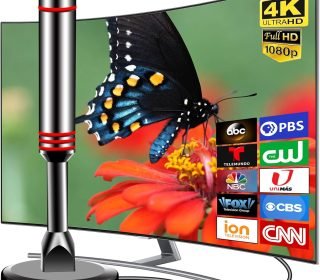
If you’re tired of paying a monthly cable bill but still want to watch local ABC, CBS, NBC, Fox, CW, PBS, Univision, and other over‑the‑air channels in HD or 4K, the ATVFuture TV Antenna for Smart TV Indoor offers a budget‑friendly cut‑the‑cord solution. This compact indoor antenna with a strong magnetic base is designed to capture local HDTV broadcasts with 360° and long‑range reception, so you can get free, high‑quality TV on your smart TV without a cable box.
Priced around $13.99, it’s a simple, no‑contract alternative to live TV services, and it’s easy to set up on most modern TVs with a coaxial (antenna) input.
Key Features
This indoor TV antenna packs several convenient features for modern smart‑TV users.
Strong Magnetic Base For Easy Placement
The antenna has a strong magnetic base that lets you stick it to metal surfaces such as:Side of a metal cabinet
Refrigerator or metal shelf
Window frame or metal TV stand
This makes it easy to position without drilling or mounting hardware.
360° & Long‑Range Reception
The 2024‑style digital design with an upgraded smart IC chip is touted to receive signals from all directions (360°) and filter out cellular and FM interference, helping you tune in more local channels from farther away.
The product listing suggests a very long effective range (often advertised around 120 miles of theoretical reception radius from broadcast towers), which is common for indoor antennas with coax‑cable‑boosted designs.Supports 4K, 1080P, and UHD HD
The antenna can receive broadcast signals in 4K, UHD, and 1080p HD, so you can enjoy crisp picture quality and clear sound for local sports, news, and other programming.Premium Coaxial Cable Included
The kit comes with a standard coaxial cable with thicker copper wiring, which is designed to reduce signal loss by up to 50% compared with basic slim cables, resulting in stronger, more stable HD reception.Easy Channel Scan & Re‑Scan
Smart TVs usually let you run a “Scan for channels” or “Auto‑tune” function. The manufacturer recommends:Placing the antenna in an open area without obstructions, then scanning.
Moving the antenna if you get only a few channels and rescanning after each reposition to capture new or stronger signals.
Works with Any Smart TV with Coax Input
As long as your TV (or a set‑top box like a Fire TV with tuner) has a 75‑ohm coaxial (antenna) input, this antenna can plug in directly and start receiving free local channels without extra hardware.
Pros and Cons
Pros
Affordable alternative to cable
At $13.99, it’s a cheap way to get free, no‑subscription local channels in HD or 4K, replacing part of a cable or live‑TV‑streaming bill.Easy, no‑drill magnetic mounting
The magnetic base lets you move it around quickly to find the best spot without screws or brackets.360° reception and strong‑cable boost
The 360° design and thicker‑copper coax cable help pull in more channels or keep signal stable, especially if you’re relatively close to broadcast towers.Supports modern smart TVs and resolutions
Compatible with 4K, UHD, and 1080p broadcasts, so your local channels look sharp and noise‑free when reception is good.Easy setup
Just:Plug the coax cable into the TV’s antenna input.
Mount the antenna on a metal or high‑up surface.
Run a channel scan.
Cons
Performance depends heavily on location
If you live far from broadcast towers or in a valley or dense urban area, indoor antennas—even high‑spec ones—may struggle to pull in many channels. In such cases, an outdoor or amplified antenna may be needed.“Miles‑range” claims are ideal‑scenario only
Advertised 120‑mile or “1000‑mile” ranges are theoretical maximums under perfect conditions; real‑world usable range is usually much shorter.Sometimes needs repositioning
You may need to experiment with antenna placement (window, near ceiling, away from walls or metal obstacles) and rescan every time you move it to get the best channel count.Noisy or pixelated picture in weak‑signal areas
In areas with weak signal, HD channels can sometimes be unstable or pixelate during storms or at certain times of day.
For most city or suburban users, the pros (cheap, easy setup, 360° magnetic base) outweigh the cons.
Detailed Review
How It Works in Practice
Using this ATVFuture antenna is straightforward:
Connect the coax cable from the antenna to the ANTENNA or RF input on your smart TV.
Mount the antenna on a metal surface or high‑up area (near a window or outside a metal cabinet) where it can “see” more of the sky.
Run a channel scan on your TV’s menu.
If you get only a few channels, move the antenna slightly and rescan.
In real‑world tests, many users report:
Getting dozens of local channels (including 4K or 1080p) if relatively close to towers.
Needing to tweak the antenna position to eliminate ghosting or signal drop‑outs.
The magnetic base making it easy to experiment with different placements without tools.
This antenna is especially useful if:
You want to cut the cord and keep local channels alive.
You already have a streaming‑only smart TV and just want free over‑the‑air news and sports.
Who It’s Best For
This antenna is ideal for:
Apartment or dorm dwellers who can’t install an outdoor antenna.
City or suburban residents within roughly 20–50 miles of TV towers (use an online tool like FCC DTV Maps to check your local broadcast range).
Budget‑conscious users who want to lower or eliminate cable/streaming‑live TV bills.
Smart TV owners who still want local news, sports, and kids’ channels without subscriptions.
It’s less ideal if:
You live very far from TV towers or in a deep valley or highly shielded building.
You want satellite‑like reliability and channel count; an outdoor or amplified antenna is better in that case.
Frequently Asked Questions
Can this replace my cable entirely?
It can replace local over‑the‑air channels (ABC, CBS, NBC, Fox, PBS, CW, Univision, etc.) in HD or 4K, but you’ll still need streaming apps (Netflix, YouTube, Prime Video) or paid services for most other content.
How many channels will I get?
That depends on your location and how close you are to broadcast towers. Some users get 20–80+ channels, while others in weak‑signal areas get far fewer.
Does it work with 4K TVs?
Yes. It supports 4K, UHD, and 1080p broadcasts, so if your local stations broadcast in 4K, you can receive them in that resolution.
Do I need an extra amplifier or box?
No. The antenna plugs directly into the TV’s coax input and uses the included coax cable. If you live in a very weak‑signal area, an amplified antenna or small signal booster may help.
Can I move it around easily?
Yes. The magnetic base lets you stick it, unstick it, and reposition it quickly during testing to find the best spot.
Why do I only see a few channels?
If you’re getting only a few channels, try:
Moving the antenna nearer a window or higher up.
Turning off nearby electronics that might cause interference.
Rescanning for channels after each move.
Final Verdict
The ATVFuture TV Antenna for Smart TV Indoor – 2024 Newest Indoor Antenna with Strong Magnetic Base, 360° & Long‑Range Reception is a compact, easy‑to‑use way to get free local HDTV channels in HD or 4K without paying a cable bill. With its magnetic base, coax‑cable boost, and 360° design, it’s a solid choice for apartment or suburban users who live within a reasonable distance of broadcast towers.
At $13.99, it’s a low‑risk way to cut the cord partially and bring local channels back into your smart‑TV setup. If you’re willing to experiment with placement and rescan, this antenna can significantly improve your free‑over‑the‑air viewing experience.
Affiliate disclaimer:
This article contains affiliate links. If you choose to purchase through one of the links, I may earn a small commission at no extra cost to you. This helps support the website and lets me keep testing and reviewing cut‑the‑cord tech and home‑entertainment products.