Xyndyx Large Under Desk Keyboard Tray Review: A Spacious Ergonomic Upgrade for Clean and Comfortable Workspaces
“This link will take you to Amazon.”
Introduction
A cluttered desk can quickly reduce productivity, especially when your keyboard and mouse take up valuable workspace. Whether you’re working long hours, gaming competitively, or studying, having a clean and ergonomic setup can make a noticeable difference in comfort and efficiency.
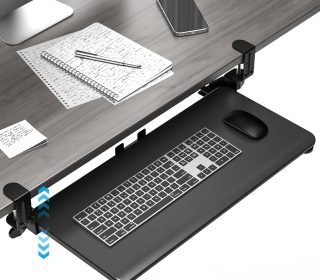
The Xyndyx Large Under Desk Keyboard Tray is designed to solve this problem by moving your keyboard and mouse below the desktop surface. With a spacious 25.6″ x 11.8″ platform (31.5″ including clamps), adjustable C-clamp installation, smooth sliding rails, and ergonomic positioning, this accessory is built to improve both desk organization and typing posture.
In this review, we’ll take a detailed look at its features, pros and cons, performance, and how it compares with similar products to help you decide if it fits your workspace needs.
Key Features
Extra-Large Keyboard and Mouse Surface
The tray provides a generous working area:
- 25.6 inches usable surface width
- 11.8 inches depth
- 31.5 inches total width including clamps
This size comfortably supports:
- Full-size keyboards
- Gaming keyboards
- Standard mice
- Small desk accessories
C-Clamp Installation (No Drilling Required)
The tray attaches securely using adjustable C-clamps, eliminating the need to drill holes into your desk.
This makes it:
- Rent-friendly
- Easy to install
- Removable without damage
Ergonomic Typing Position
By positioning your keyboard below desk level, the tray helps promote:
- More natural wrist alignment
- Reduced shoulder strain
- Improved sitting posture during long work sessions
Smooth Sliding Rail System
The pull-out mechanism allows the tray to extend up to 7.8 inches for easy access.
It also slides back neatly under the desk when not in use, keeping your workspace clean and organized.
Strong Clamp Support
The heavy-duty adjustable C-clamps fit desks up to 2.76 inches thick and include anti-slip padding for added stability.
Built-In Keyboard Safety Stop
A rear edge baffle prevents your keyboard and mouse from sliding off during use.
Pros and Cons
Pros
✔ Large surface for keyboard and mouse
✔ No drilling required
✔ Easy installation and removal
✔ Smooth sliding mechanism
✔ Improves desk organization
✔ Ergonomic typing support
✔ Strong clamp stability
✔ Suitable for gaming and office use
✔ Space-saving design
✔ Multiple color options available
Cons
✘ Requires desk with flat underside
✘ Not compatible with crossbars or curved desk frames
✘ Needs careful measurement before purchase
✘ Can slightly reduce legroom on smaller desks
✘ Limited height adjustment options
Detailed Review
Build Quality and Design
The Xyndyx Large Keyboard Tray features a simple but functional design focused on everyday usability. The black finish gives it a clean, professional appearance that blends well with most office and gaming setups.
The structure feels solid enough for daily typing and mouse movement. The reinforced frame and clamp system help reduce wobbling, which is important for maintaining stability during fast typing or gaming sessions.
Overall, it prioritizes practicality over luxury design, which is expected in this price range.
Desk Compatibility
This is one of the most important factors to consider before buying.
The tray requires:
- A flat, unobstructed underside
- At least 31.5 inches of mounting width
- No crossbars or support beams underneath
If your desk does not meet these conditions, installation will not be possible.
Because of this, users should always measure their desk before purchasing.
Installation Experience
Installation is straightforward and does not require drilling.
Steps generally include:
- Positioning the tray under the desk
- Aligning the clamps
- Tightening the mounting system
- Testing slide function
Most users can complete setup with basic tools in a short amount of time.
This makes it especially appealing for renters or users who want a non-permanent setup.
Workspace Organization Benefits
One of the biggest advantages of this keyboard tray is the extra space it creates.
By moving your keyboard and mouse underneath the desk, your desktop becomes more open for:
- Monitors
- Documents
- Office supplies
- Drawing tablets
- Gaming accessories
This can significantly improve workspace cleanliness and reduce visual clutter.
For smaller desks, the difference is especially noticeable.
Ergonomic Performance
The ergonomic design is one of the main selling points of this product.
Typing at desk level can sometimes lead to:
- Wrist strain
- Shoulder tension
- Poor posture
By lowering the keyboard position, this tray encourages a more natural arm angle.
Potential benefits include:
- Reduced wrist pressure
- More relaxed shoulder positioning
- Improved long-term comfort during work or gaming
While results vary by user, many people find under-desk trays helpful for long sessions.
Sliding Mechanism
The smooth glide rail system allows the tray to:
- Extend out quickly for typing
- Retract when not in use
- Operate quietly without resistance
The 7.8-inch extension provides enough space for comfortable use without feeling unstable.
The sliding motion is smooth enough for daily office use, gaming setups, or general browsing.
Stability During Use
Stability is a common concern with clamp-mounted accessories, but this tray performs well in normal conditions.
The combination of:
- Reinforced steel frame
- Tightening C-clamps
- Anti-slip padding
helps keep the tray secure during typing.
It remains stable for most standard keyboard and mouse use, even during faster typing sessions.
Gaming and Work Performance
For gamers and professionals alike, the tray offers practical advantages:
For Office Work:
- Cleaner desk layout
- Better posture support
- More room for documents
For Gaming:
- Extra mouse movement space
- Reduced desktop clutter
- Flexible positioning
It is particularly useful for users with compact gaming desks.
Who Should Buy This Product?
Remote Workers
Ideal for improving posture and workspace organization during long work hours.
Students
Helps create extra study space on small desks.
Gamers
Provides more mouse movement room and a cleaner setup.
Small Desk Owners
Maximizes limited workspace efficiently.
Renters
No drilling makes it perfect for temporary setups.
Who Should Avoid It?
Users with Non-Compatible Desks
If your desk has crossbars, curved edges, or a non-flat underside, it will not fit.
Users Needing Adjustable Height Systems
This tray does not offer advanced height customization.
Users with Very Small Desks
Limited width may make installation difficult.
Comparison with Similar Products
Xyndyx Keyboard Tray vs No Tray Setup
Xyndyx Advantages:
- More desk space
- Better ergonomics
- Cleaner setup
- Improved organization
No Tray Advantages:
- Zero installation required
Xyndyx Tray vs Screw-Mounted Trays
Xyndyx Advantages:
- No drilling
- Easier installation
- Removable design
Screw-Mounted Advantages:
- More permanent stability
Xyndyx Tray vs Compact Keyboard Trays
Xyndyx Advantages:
- Larger surface area
- Space for both keyboard and mouse
- Better usability for gaming
Frequently Asked Questions
Does this require drilling?
No. It uses adjustable C-clamps for installation.
What desk type is required?
A flat underside desk without crossbars or curves.
Can it hold both keyboard and mouse?
Yes, the large surface supports both comfortably.
How far does it extend?
The tray slides out up to 7.8 inches.
Is it stable during typing?
Yes, when properly installed using the clamps.
Is it suitable for gaming?
Yes, it works well for gaming setups requiring extra mouse space.
Does it damage the desk?
No, the clamps include protective padding.
Final Verdict
The Xyndyx Large Under Desk Keyboard Tray is a practical and affordable solution for improving workspace organization and comfort. Its large surface area, smooth sliding mechanism, no-drill installation, and ergonomic positioning make it suitable for office users, students, and gamers alike.
While desk compatibility is an important factor to check before purchasing, users with suitable desks will likely benefit from a cleaner, more efficient, and more comfortable setup.
If you’re looking for a simple way to free up desk space and improve typing posture without permanent modifications, this keyboard tray is a strong and cost-effective choice.
Affiliate Disclaimer
This article contains affiliate links. If you purchase through these links, we may earn a small commission at no extra cost to you. This helps support our content creation and allows us to continue providing helpful and honest product reviews. Always verify product dimensions and desk compatibility before purchasing.