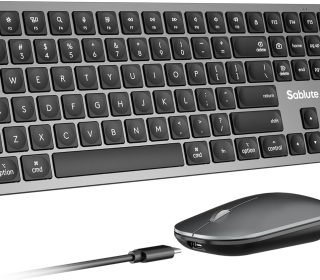
This SABLUTE KMA2 combo is a Mac‑style, Bluetooth‑only keyboard and mouse set aimed at people in the Apple ecosystem
“This link will take you to Amazon.”
Key things it offers
Full‑size Mac layout: You get Mac‑native keys, including Command/Option placement, Mac media keys, and a numpad, so shortcuts feel like an Apple keyboard with almost no adjustment. This is useful if you constantly use macOS shortcuts for productivity.
3‑device Bluetooth: You can pair up to three devices (for example, iMac, MacBook, and iPad) and switch via BT1/BT2/BT3, which is ideal if you’re working across multiple Apple devices during the day.
Quiet scissor keys: The low‑profile scissor mechanism gives a laptop‑like feel with reduced noise, which suits offices, shared rooms, and late‑night work. Similar SABLUTE combos are consistently noted for quiet typing and clicking.
USB‑C rechargeable: Both keyboard and mouse use USB‑C, and the box includes a USB‑C to USB‑C cable, which pairs well with newer Macs and iPads that already use USB‑C. Comparable SABLUTE sets often run for weeks per charge, with long standby times thanks to auto‑sleep.
Mac‑aesthetic build: It uses a metallic‑like space‑gray finish with anti‑slip pads, so visually it fits well next to a Space Gray Mac or MacBook and feels more premium than plastic‑only budget sets.
Mouse at 1200 DPI: Fixed 1200 DPI is a middle‑ground sensitivity that works fine for office use, spreadsheets, and browsing, though it’s not tuned for gaming or high‑precision creative work.
Important limitations and caveats
Bluetooth only, no dongle: This set does not include a 2.4 GHz USB receiver. That means your Mac/desktop must already have Bluetooth and you may need another mouse/keyboard just for the first pairing, especially on a Mac mini or desktop setup. SABLUTE’s manuals for other models explicitly warn that tablets/phones need appropriate connectivity or adapters, and similar limitations apply here.
Not ideal for non‑Bluetooth desktops: If you’re planning to use it on a PC tower with no Bluetooth or on devices that only support USB receivers, this combo will be a poor fit compared with SABLUTE’s 2.4 GHz models that ship with a dongle.
Fixed DPI mouse: Some other SABLUTE combos offer adjustable DPI and more ergonomic mouse designs; this one is simpler, tuned for everyday office tasks rather than gaming or design.
Limited review volume: The listing you shared only has around a dozen reviews so far with a 4.5 rating, so user feedback is positive but still early compared with long‑standing best‑sellers.
Quick comparison: this vs typical SABLUTE combos
| Aspect | KMA2 Mac Bluetooth combo (yours) | Typical SABLUTE 2.4 GHz combo (e.g., MA12 / KL3Pro) |
|---|---|---|
| Connection | Bluetooth only (3 devices) | 2.4 GHz USB dongle, sometimes single‑device |
| Layout | Mac‑specific full size | Mixed Mac/Windows or Windows‑centric |
| Charging | USB‑C rechargeable | USB‑C rechargeable or AA batteries, varies |
| Backlighting | Not emphasized / likely none | Often RGB / multi‑color backlight on premium lines |
| Mouse DPI | Fixed 1200 DPI | Often adjustable DPI in 3+ steps |
| Best use case | Apple multi‑device productivity | General desktop, sometimes gaming/ergonomic focus |
Given your background in affiliate content and tech, this model positions well as a “budget Magic Keyboard alternative for Mac users who need multi‑device Bluetooth and quiet typing” rather than a gaming or RGB‑focused choice.
If your goal is to write an affiliate review or decide whether to recommend it, what’s your primary angle: Mac‑only productivity, budget Magic Keyboard alternative, or a general “best wireless combos under $50 for Mac