Copulan Excel Shortcut Keys Mouse Pad Review – 31.5×11.8" Washable Desk Mat for Office & Gaming
“This link will take you to Amazon.”
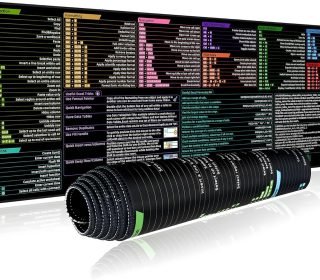
If you spend hours in Excel, Google Sheets, or data‑heavy work, the Copulan Excel Shortcut Keys Mouse Pad is a smart, dual‑purpose desk mat that doubles as a function‑packed cheat sheet and smooth‑gliding mouse surface. At $9.99, this 31.5×11.8‑inch (800×300 mm) extended desk mat covers your keyboard and mouse area, keeps your wrists comfy, and puts Excel shortcuts right under your fingertips—no more alt‑tabbing to Google.
What this extended mouse pad is
Size: 31.5″ L × 11.8″ W (800 × 300 mm), about the width of a full‑size keyboard plus room for your mouse and maybe a small notebook.
Layered build:
Top surface: Micro‑weave fabric with water‑resistant coating and fade‑resistant shortcut printing.
Base: Heavy‑duty natural rubber with non‑slip, anti‑curl grip that sticks to wood, glass, and metal desks.
Thickness: Around 2 mm, so it’s thin enough to slide under a laptop leg but thick enough to feel like a real desk mat.
It’s marketed for office, gaming, and productivity, but the main draw is the Excel shortcut layout, not just the glide.
Shortcut layout and productivity benefits
Printed Excel & Google Sheets shortcuts
The mat lists core formulas, pivot‑table shortcuts, data‑analysis functions (like VLOOKUP, XLOOKUP, SUMIFS, etc.), plus common navigation and formatting shortcuts.
Many similar “Excel shortcut mats” also sneak in basic Word/PowerPoint shortcuts, so you can use the same pad for mixed‑application workflows.High‑contrast, readable printing
Dark letters on a light background (or vice‑versa) make it easy to glance down and find the right key combo without leaning in.Why it helps
Less time hunting online for Ctrl+Shift+@ or Alt+D+P.
Great for accountants, analysts, students, and admins who live in spreadsheets.
Surface feel, glide, and comfort
Micro‑weave fabric top
Soft, smooth surface that’s gentle on your wrist but still fast enough for gaming and precise cursor control.
Works well with laser and optical mice across both office and light gaming use.
Optimized balance of speed and control
Not as “glass‑fast” as hard‑shell gaming pads, but smoother than a cheap cloth pad, which reduces drag and hand‑fatigue over long sessions.
Washable and spill‑resistant
Wipe with a damp cloth for light dirt or coffee spills.
The water‑resistant coating helps resist stains and light liquids so the printed shortcuts don’t fade easily.
Non‑slip base and desk setup
Rubber base grips firmly
Sticks well to wood, glass, and metal desks so the mat doesn’t creep as you move your mouse or type.
Some users report light rubber smell out of the box, which fades with airing.
Extended coverage
With 31.5″ of length, you can fit a full‑size keyboard + mouse + small items (phone, calculator, coffee mug), which keeps your workspace clean and unified.
Pros and cons
Pros
Increases Excel productivity
Having key shortcuts printed where you work cuts down on tab‑switching and guessing combos.Large, unified workspace
Covers keyboard + mouse area in one slip‑resistant mat, giving a neater, pro‑looking desk.Comfortable, washable fabric surface
Soft for the wrist, easy to wipe clean, and resistant to light spills and fading.Strong grip and anti‑curl base
Natural rubber keeps it flat and stable on most surfaces.Great value at ~$10
Cheap compared with premium gaming XL pads while still providing good glide and durability.
Cons
Not a hardcore gaming‑grade pad
It’s good for casual gaming, but competitive players may prefer thicker, specialized gaming pads with tighter tracking.Ink quality depends on batch
Cheaper shortcut pads sometimes show fading or smudging over time if you frequently wipe with alcohol or strong cleaners.Size may be too wide for small desks
31.5″ stretches most desks; on a cramped station, it can push other items right off the edge.
Who should buy this mouse pad
Ideal for:
Spreadsheet users:
Accountants, financial analysts, teachers, students, admins who live in Excel or Google Sheets.
Office workers:
Anyone who wants a clean, large desk mat with built‑in productivity help.
Casual gamers:
Can handle light‑to‑moderate gaming without extra cost.
Less ideal for:
eSports / competitive gamers who need micro‑tuned, branded gaming pads.
Minimalist desk setups where every millimeter counts.
Final Verdict
The Copulan Excel Shortcut Keys Mouse Pad is a practical, inexpensive upgrade for anyone who works with spreadsheets all day. It cleans up your desk, improves wrist comfort, and acts like a built‑in Excel cheat sheet—all at a fraction of the price of premium gaming mats.
If you want both a smoother, larger mouse‑keyboard surface and quick access to Excel shortcuts, this is a smart, budget‑friendly pick.