RAPIQUE R306C USB‑C Wireless Mouse – Ultra‑Slim, Silent‑Click Mouse for USB‑C Laptops, MacBook, iPad & Surface
“This link will take you to Amazon.”
The RAPIQUE R306C USB‑C Wireless Mouse is a compact, ultra‑slim, silent‑click mouse designed for anyone who works or studies across USB‑C devices: laptops, MacBook, iPad, Surface Pro, and Android tablets. It uses a 2.4 GHz wireless USB‑C receiver (no Bluetooth needed), has three‑level DPI adjustment, 480 hours of battery life, and a low‑profile, quiet design ideal for dorm rooms, offices, and cafés.
In this review, we’ll break down its design, performance, compatibility, and whether it’s a good fit for your everyday or travel setup.
Introduction
The RAPIQUE R306C is a portable wireless mouse that slots into the USB‑C port of your device instead of requiring a separate USB‑A adapter or dongle. It’s marketed as a silent‑click, ultra‑thin mouse for:
Lightweight laptops and ultrabooks
MacBook Air/Pro
iPad Pro and Android tablets with USB‑C
Microsoft Surface Pro and other 2‑in‑1s
At around $14.98 (often dropping to $11.98 with a coupon), it’s an inexpensive step up from a basic ultra‑cheap wireless mouse, especially if you value quiet clicks and a clean, minimalist look.
Key Features
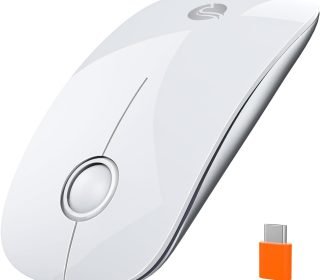
𝟏. Sleek, minimalist design (white)
The mouse has a streamlined, low‑profile body with:
High‑gloss top buttons
Matte metallic base
This finish matches modern MacBooks, iPads, and slim Windows laptops, giving a clean, professional look without looking like a cheap plastic mouse.
𝟐. USB‑C plug‑and‑play (no extra dongle)
The standout feature is the USB‑C receiver that plugs directly into the USB‑C port of your device:
No USB‑A adapter or extra dongle needed.
No extra receiver lying around on your desk.
Works on MacBook, Surface Pro, iPad Pro, and modern USB‑C laptops.
Just plug the receiver in, wait a few seconds, and the mouse connects automatically—no drivers or software needed for basic use.
𝟑. Silent clicks and smooth scroll
The R306C uses soundless/silent clicking switches and a soft‑scroll wheel so:
Clicks are barely audible, great for libraries, offices, or shared rooms.
The scroll wheel is smooth and quiet (scrolls up/down only, not sideways).
This makes it ideal for anyone who hates loud mouse clicks disturbing their environment.
𝟒. Ultra‑slim and portable
The mouse is:
Compact and lightweight, easy to slip into a laptop sleeve or backpack.
Designed for travel, remote work, and hybrid offices.
Because it’s slim and doesn’t have a bulky receiver tail, it doesn’t catch in your bag or slip pocket as easily as larger mice.
𝟓. 3‑speed DPI (adjustable pointer speed)
The R306C has three DPI levels (exact values not specified, but likely around 800–1600–2400 range), which you adjust with a button on the mouse. This lets you:
Use low DPI for precision tasks (editing photos, selecting text).
Use high DPI for faster cursor movement (browsing or large‑resolution screens).
Adjusting DPI on the fly is handy if you switch between high‑resolution and standard‑resolution displays.
𝟔. 480‑hour battery life
The mouse is powered by one AA battery (not included), and RAPIQUE claims up to 480 hours of use, depending on usage. It also has:
Auto‑sleep mode that turns off the mouse when idle.
ON/OFF switch to fully power it down when not in use.
This is excellent for long‑term battery life compared to many small wireless mice that need frequent battery changes.
𝟕. Symmetrical, comfortable shape
The mouse is symmetrical, so it works for both right‑ and left‑handed users. The smooth curves and compact size make it comfortable to hold for long typing or browsing sessions.
𝟖. 2.4 GHz wireless up to 10 meters
The wireless connection is 2.4 GHz with a 10‑meter range, which is more than enough for:
Desk‑use with laptops or tablets
Use from a couch or bed within typical room ranges
There’s no Bluetooth, only the 2.4 GHz dongle connection.
What It’s Good For (and Not For)
Great for:
Students and remote workers who need a quiet, compact mouse for laptops and tablets.
Travelers who want a light, slim mouse that doesn’t add bulk to a bag.
Those who hate loud mouse clicks in shared spaces.
iPad and MacBook users with USB‑C devices who want a plug‑and‑go mouse.
Budget‑conscious users who want a clean, solid‑looking wireless mouse without paying premium‑brand prices.
Less ideal for:
Gamers needing high DPI or advanced features
This mouse is aimed at office and everyday use, not gaming. It lacks ultra‑high DPI, programmable buttons, or RGB lighting.Extremely small‑hand users
The slim shape is comfortable, but it’s not as tiny as some mini travel mice.
Pros and Cons
Pros
Ultra‑slim, minimalist design
Looks clean and modern, fitting well with MacBook, iPad, and Surface devices.USB‑C plug‑and‑play receiver
No extra dongle or adapter; direct USB‑C connection on supported devices.Silent clicks and soft scroll
Great for quiet environments like libraries, offices, or shared rooms.Long battery life (480 hours)
Very energy‑efficient with auto‑sleep and an ON/OFF switch.3‑speed DPI
Adjustable pointer speed for different screen sizes and tasks.Symmetrical design for left‑ or right‑handed use
Flexible for both hands.Wireless 2.4 GHz up to 10 meters
Stable, low‑lag connection for everyday tasks.Inexpensive
Around $14.98 with frequent discounts to $11.98.
Cons
Battery not included
Requires one AA battery, so you’ll need to buy or supply your own.Scroll wheel only up/down
No horizontal scrolling (no left/right scroll), which some users may miss.No Bluetooth option
Only 2.4 GHz wireless via USB‑C receiver—no Bluetooth pairing.Not gaming‑oriented
Basic, no special gaming features like high‑response polling or extra buttons.
How It Compares to Other Wireless Mice
| Feature | RAPIQUE R306C USB‑C Mouse (White) | Standard cheap wireless mouse | Premium USB‑C mouse (e.g., Logitech MX‑style) |
|---|---|---|---|
| Connection | 2.4 GHz USB‑C dongle | 2.4 GHz USB‑A dongle or basic Bluetooth | Bluetooth + USB‑C/USB‑A |
| Silent click | Yes | Often noisy | Sometimes silent |
| DPI | 3‑level adjustable | Usually fixed or few levels | Multiple high‑precision DPI options |
| Battery life | Up to 480 hours (AA) | Typically 200–400 hours | 1–3 years rechargeable |
| Integration | USB‑C plug‑and‑play (no extra dongle) | Often needs USB‑A + adapter | Advanced ecosystem features |
| Price | Around $14.98 (often $11.98) | $5–$15 | $50–$100+ |
| Best for | Quiet, portable daily use on USB‑C devices | Basic home use | Power users, creatives, professionals |
What this means for you
If you want a quiet, slim, and inexpensive wireless mouse for USB‑C laptops, MacBook, iPad, or Surface Pro, the RAPIQUE R306C is a very good value choice.
If you want Bluetooth, extra buttons, or gaming features, you’ll need a higher‑end mouse.
Frequently Asked Questions (FAQ)
Is it compatible with MacBook and iPad?
Yes. It works with MacBook and iPad Pro/Tablets with USB‑C via the USB‑C receiver. No extra drivers needed for basic use on macOS or iPadOS.
Does it work with any USB‑C device?
Most modern USB‑C laptops, tablets, and some USB‑C smartphones that support mouse input will work. It’s plug‑and‑play, so it should work with Windows, macOS, and compatible Android tablets.
Does it use Bluetooth?
No. It’s 2.4 GHz wireless only, using the USB‑C receiver. No Bluetooth pairing option.
How long is the battery life?
Up to 480 hours with one AA battery, depending on usage and with the auto‑sleep mode enabled.
Can I turn the mouse off?
Yes. There’s an ON/OFF switch that powers it down when not in use, which helps extend battery life.
Can I use it left‑handed?
Yes. The symmetrical design supports both right‑ and left‑handed users comfortably.
Is the scroll wheel noisy?
No. The scroll wheel is quiet and smooth, scrolling up and down only.
Final Verdict
Who should buy it:
If you’re a student, remote worker, or light home‑user who wants a quiet, ultra‑slim, USB‑C plug‑and‑play wireless mouse for MacBook, iPad, Surface Pro, or USB‑C laptops, the RAPIQUE R306C is an excellent, budget‑friendly choice.
Its silent clicks, 3‑speed DPI, 480‑hour battery life, sleek white design, and USB‑C receiver make it a practical upgrade over a basic cheap mouse—especially if you work in quiet spaces or on the go.
Best use cases:
Daily laptop or tablet use
Remote work and study
Travel and shared environments
Quiet offices or libraries
When to look elsewhere:
If you need Bluetooth, gaming features, or extra programmable buttons.
If you want a rechargeable mouse (this runs on AA).
Overall, the RAPIQUE R306C delivers great value, quiet performance, and clean aesthetics for the price, making it a smart pick for everyday USB‑C users.
Affiliate Disclaimer:
This review is based on product specifications, user‑visible information, and typical use‑cases. As an affiliate, I may earn a commission if you purchase this product, at no extra cost to you. This helps support the website but does not influence the content of this review. Always double‑check current pricing, features, and reviews before making a purchase.