Jumper EZpad V12 Pro Review: A Versatile 2-in-1 Windows Tablet and Laptop for Work, Study, and Everyday Use
“This link will take you to Amazon.”
Introduction
The demand for portable computing devices has grown significantly in recent years. Many users want the flexibility of a tablet combined with the productivity of a laptop, without carrying multiple devices. Whether you’re a student attending online classes, a professional working remotely, or someone who enjoys browsing, streaming, and light productivity tasks, a 2-in-1 device can offer an appealing balance between convenience and functionality.
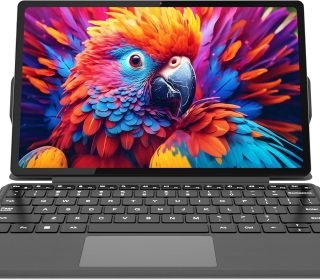
The Jumper EZpad V12 Pro is designed to fill that role. Combining a 12-inch 2K touchscreen display, detachable magnetic keyboard, Windows 11 operating system, Intel Pentium Gold processor, and lightweight metal construction, this device aims to provide both portability and productivity in a single package.
Unlike traditional laptops, the EZpad V12 Pro can function as both a tablet and a notebook-style computer, making it suitable for a wide range of users. In this detailed review, we’ll explore its design, display, performance, battery life, features, strengths, weaknesses, and whether it’s worth considering for your needs.
Key Features
1. 2-in-1 Laptop and Tablet Design
Functions as both a touchscreen tablet and a lightweight laptop with a detachable magnetic keyboard.
2. 12-Inch 2K IPS Touchscreen
Features a 2000 × 1200 resolution display with 10-point touch support.
3. Intel Pentium Gold 6500Y Processor
Dual-core processor with turbo speeds up to 3.4GHz.
4. 12GB RAM
Provides memory capacity for multitasking and everyday productivity tasks.
5. 256GB SSD Storage
Fast solid-state storage with support for additional expansion via TF card.
6. Windows 11 Home
Comes pre-installed and ready to use.
7. Lightweight Metal Construction
Weighs approximately 0.64kg for easy portability.
8. Dual Type-C Ports
Supports charging, data transfer, and video output.
9. Dual Cameras
Front and rear cameras for video calls and basic photography.
10. Dual Stereo Speakers
Provides audio for media consumption and online meetings.
Pros and Cons
Pros
✓ Versatile 2-in-1 design
✓ High-resolution 2K touchscreen
✓ Lightweight and portable
✓ Includes detachable magnetic keyboard
✓ Windows 11 Home pre-installed
✓ 12GB RAM for multitasking
✓ SSD storage for faster performance
✓ Dual USB-C connectivity
✓ Expandable storage options
✓ Suitable for students and office work
Cons
✗ Intel Pentium processor is not designed for demanding workloads
✗ Battery capacity is smaller than some premium competitors
✗ Integrated graphics limit gaming performance
✗ Cameras are designed primarily for basic use
✗ Premium price compared to some entry-level laptops
Detailed Review
Design and Build Quality
One of the strongest aspects of the Jumper EZpad V12 Pro is its design.
The device combines the portability of a tablet with the productivity benefits of a traditional laptop. The detachable magnetic keyboard allows users to quickly switch between work mode and tablet mode depending on their needs.
The metal body gives the device a premium appearance while also improving durability compared to many plastic alternatives.
At approximately 0.64 kilograms, the EZpad V12 Pro is lightweight enough for:
- Daily commuting
- Travel
- Classroom use
- Business meetings
- Remote work setups
Its slim profile also makes it easy to store in backpacks and laptop sleeves.
Display Quality
The display is one of the most important features of any portable device, and the EZpad V12 Pro offers a respectable specification for its category.
12-Inch 2K IPS Touchscreen
The screen features:
- 2000 × 1200 resolution
- IPS panel technology
- 10-point touch support
- Anti-glare design
- Full-fit touchscreen construction
Visual Experience
The higher-than-standard Full HD resolution helps provide:
- Sharper text
- Improved image clarity
- Better document readability
- Enhanced video viewing
IPS technology contributes to:
- Wide viewing angles
- Consistent color reproduction
- Better screen visibility
The touchscreen functionality adds flexibility when navigating Windows 11.
Performance
Intel Pentium Gold 6500Y Processor
The EZpad V12 Pro uses the Intel Pentium Gold 6500Y processor.
Key specifications include:
- Dual-core architecture
- Four threads
- Turbo speeds up to 3.4GHz
- 4MB cache
This processor is designed primarily for:
- Office applications
- Web browsing
- Online learning
- Video conferencing
- Media consumption
Real-World Usage
For everyday computing tasks, the processor should provide sufficient performance for:
- Microsoft Office applications
- Google Workspace
- Web-based productivity
- Streaming services
- Online classes
- Basic photo management
However, users should understand that this is not a workstation-class processor.
Demanding tasks such as:
- Professional video editing
- 3D rendering
- Advanced gaming
- Large-scale content creation
are outside its primary target use case.
Memory and Storage
12GB RAM
The inclusion of 12GB RAM is a significant advantage.
Many budget-friendly Windows devices still ship with 4GB or 8GB of memory.
Benefits include:
- Better multitasking
- Smoother application switching
- Improved browser performance
- Greater responsiveness
Users who frequently work with multiple browser tabs and applications will appreciate the additional memory capacity.
256GB SSD
The solid-state drive provides:
- Faster boot times
- Improved application loading
- Better overall responsiveness
For most users, 256GB is sufficient for:
- Documents
- Presentations
- School projects
- Everyday applications
Expandable Storage
The TF card slot supports storage expansion, offering additional flexibility for users with larger media libraries.
Keyboard and Productivity Features
The detachable magnetic keyboard transforms the tablet into a functional laptop alternative.
Benefits include:
- Comfortable typing
- Improved productivity
- Easier document editing
- Better multitasking workflows
The adjustable stand further enhances usability by allowing users to choose comfortable viewing angles.
For students and professionals, this flexibility can make a noticeable difference during long work sessions.
Windows 11 Experience
The device comes with Windows 11 Home pre-installed.
Advantages include:
- Familiar desktop environment
- Broad software compatibility
- Access to productivity applications
- Touchscreen optimization
- Security updates
Unlike mobile operating systems, Windows allows users to run many traditional desktop applications, increasing versatility.
Battery Life
The EZpad V12 Pro includes a 4300mAh battery.
The manufacturer indicates support for up to 8 hours of video playback under certain conditions.
Actual battery life will vary depending on:
- Screen brightness
- Application usage
- Connectivity settings
- Workload intensity
For many users, the battery should comfortably support:
- School sessions
- Meetings
- Travel use
- Daily productivity tasks
Charging convenience is enhanced through USB-C connectivity.
Connectivity Options
The connectivity features are surprisingly comprehensive for a compact device.
Dual USB-C Ports
These ports support:
- Charging
- Data transfer
- External displays
Wireless Connectivity
Includes:
- Dual-band Wi-Fi
- Bluetooth 5.0
These features support modern accessories and stable internet connectivity.
Additional Ports
The 3.5mm audio jack remains useful for wired headphones and headsets.
Cameras and Audio
Front Camera
Suitable for:
- Video calls
- Online classes
- Virtual meetings
Rear Camera
Useful for:
- Quick photos
- Document scanning
- Basic image capture
Dual Stereo Speakers
The dual-speaker setup improves media consumption compared to single-speaker devices.
Users can enjoy:
- Video streaming
- Online lectures
- Video conferences
- Casual entertainment
Who Should Buy This Product?
Ideal For:
Students
Excellent for online learning, note-taking, and assignments.
Remote Workers
Suitable for productivity, communication, and document management.
Travelers
Lightweight and compact for mobile use.
Casual Users
Ideal for browsing, streaming, and everyday computing.
Home Office Users
A practical alternative to bulkier laptops.
May Not Be Ideal For:
- Professional content creators
- Hardcore gamers
- Engineers running demanding software
- Users requiring workstation-level performance
Comparison with Similar Products
Jumper EZpad V12 Pro vs Traditional Laptops
EZpad Advantages
- Touchscreen functionality
- Tablet mode
- Greater portability
- Lighter weight
Traditional Laptop Advantages
- Often more powerful hardware
- Larger keyboards
- Better cooling systems
Jumper EZpad V12 Pro vs Android Tablets
EZpad Advantages
- Full Windows 11 operating system
- Desktop software support
- Better productivity workflow
Android Tablet Advantages
- Larger app ecosystem for mobile apps
- Longer battery life in some models
Jumper EZpad V12 Pro vs Premium 2-in-1 Devices
EZpad Advantages
- Competitive specifications
- Included keyboard
- More affordable than some flagship alternatives
Premium Devices Advantages
- Faster processors
- Higher-end displays
- Enhanced build quality
Frequently Asked Questions
Is the keyboard included?
Yes. The device includes a detachable magnetic keyboard.
Does it support touch input?
Yes. The display supports 10-point touchscreen functionality.
Can storage be expanded?
Yes. A TF card slot is available for additional storage.
Is Windows 11 pre-installed?
Yes. Windows 11 Home comes pre-installed.
Can it be used as a tablet?
Yes. The keyboard detaches, allowing tablet-only use.
Is it suitable for online classes?
Yes. The combination of Windows 11, cameras, speakers, and keyboard makes it suitable for educational use.
Can it handle office applications?
Yes. It is designed for productivity tasks such as word processing, spreadsheets, presentations, and web-based work.
Final Verdict
The Jumper EZpad V12 Pro successfully combines portability, touchscreen convenience, and Windows productivity into a versatile 2-in-1 device. Its 12-inch 2K IPS display, detachable keyboard, lightweight metal construction, 12GB RAM, and SSD storage make it an attractive option for students, professionals, and everyday users seeking flexibility without carrying a full-sized laptop.
While the Intel Pentium Gold processor limits its suitability for demanding workloads, it performs well within its intended role as a productivity-focused mobile device. The inclusion of Windows 11, dual USB-C ports, expandable storage, and a high-resolution touchscreen further strengthens its value proposition.
For users looking for a portable Windows-based 2-in-1 solution for study, work, travel, and everyday computing, the Jumper EZpad V12 Pro is a compelling option worth considering.
Affiliate Disclaimer
Disclosure: This article contains affiliate links. If you purchase through these links, we may earn a small commission at no additional cost to you. This helps support our work and allows us to continue publishing helpful, unbiased product reviews. All recommendations are based on available product information and objective analysis.